

When we travel abroad, Google Maps is usually the first thing we open.
I’m the same. I keep Google Maps right on my home screen whenever I travel. I’m sure you do, too.
But did you know that Korea is one of the few countries where Google Maps doesn’t work very well?
Now, that doesn’t mean Google Maps is completely useless in Korea. You can still check transit routes and look up general directions. If you’re a short-term traveler, you probably won’t notice major issues.
But if you plan to stay longer or if you’re already living here, you’ve probably started to notice the inconvenience.
No updated transit information…
No road closures…
GPS suddenly losing your location…
So here’s the bottom line:
You need a Korea-specific map—Naver Map or Kakao Map.
While you’re here, feel free to move Google Maps off your home screen. You won’t need it much.
(And by the way, this post is not sponsored or affiliated at all!)
Why Google Maps Doesn’t Work Well in Korea
There are two main reasons why Naver Map and Kakao Map work far better in Korea: legal restrictions and technical challenges.
Korea Restricts High-Resolution Map Data From Leaving the Country
For national security reasons, Korea has long restricted the export of high-precision map data—such as buildings, roads, and geographic information.
But Google processes much of its map data abroad, which means it can’t fully access or update high-precision map information inside Korea.
Because of this, Google Maps has struggled with detailed navigation, street view imagery, and real-time traffic or transit updates.
On the other hand, Naver and Kakao, both Korean companies, store their data on Korean servers.
This allows them to collect and update information, then apply those updates directly to their map apps.
As of February 2026, however, the Korean government has conditionally approved Google’s request to use that data overseas, though several strict security conditions remain in place.
Related Post
Korea Approves High-Precision Map Data Export: Could Google Maps Finally Work Properly in Korea?
Korea Moves Fast — and Maps Need to Keep Up
Korea is a country where new buildings go up quickly, stores change hands all the time, and cafes can pop up in just one to three months. Road construction and bus stop relocations happen constantly, too.
Naver Map and Kakao Map update these changes almost in real time, often much faster than global map services, sometimes within days.
Even road views are updated on a regular cycle (usually every few months or annually).
I often joke that if a place disappears from Naver Map, it may already have closed.
They also update public transportation disruptions quickly, especially during snowstorms, accidents, or emergency delays.
Google Maps, unfortunately, updates much slower in Korea. This often results in outdated or inaccurate information.
Tailored for Korean Life: More Detailed, More Practical
Korean addresses rely heavily on “dong” (building numbers) and “ho” (the individual unit number inside that building), especially in apartments and office complexes.
In simple terms:
- Dong refers to the specific building within a complex.
- Ho refers to the individual unit or household inside that building.
Naver Map and Kakao Map recognize both, while Google Maps doesn’t.
Korean map apps are optimized for how people navigate in Korea.
Koreans want to know which subway car makes transfers faster, which bus arrives the soonest, which exit gets them out the quickest, whether a bus is crowded, and whether express buses still have seats available.
Korean map applications provide all of this!
Their Road View is updated frequently, so the images are very current—even tiny alleys and rural backroads are all covered.
If you wanted to, you could “drive” from Seoul to Busan using Road View alone. (LOL)
To be clear, I don’t mean Google Maps is bad. I absolutely rely on it when I travel internationally.
But in Korea, Korean map applications simply work better.
How to Use Naver Map: Essential Features You Need
There are several Korean map apps, but the one I recommend most is Naver Map.
(Again, not sponsored!)
It’s the most widely used map among Koreans, including myself.
Unlike Kakao Map, which only supports English, Naver Map supports English, Chinese, and Japanese.
It can also automatically adjust based on your device language.
Here’s what the app looks like.
Once you download it, check your language settings.
In most cases, the app will automatically switch to your system language.
If not, you can change it manually:

- Tap the profile icon next to the search bar
- Tap the gear icon (⚙️)
- Go to Language → choose your preferred language
Finding directions on Naver Map is similar to Google Maps.
But here are the five essential features that will make your life in Korea easier.
1. Navigation & Routes
Naver Map gives you routes for public transit, driving, walking, and cycling.
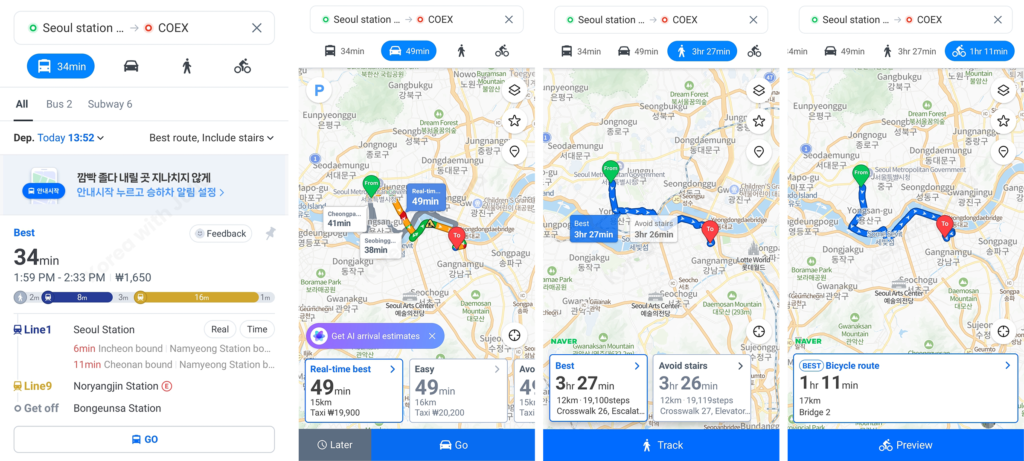
For driving and walking, you can press “Go” or “Track” to activate full navigation mode.

Your previous routes and searches are also saved, even without logging in.
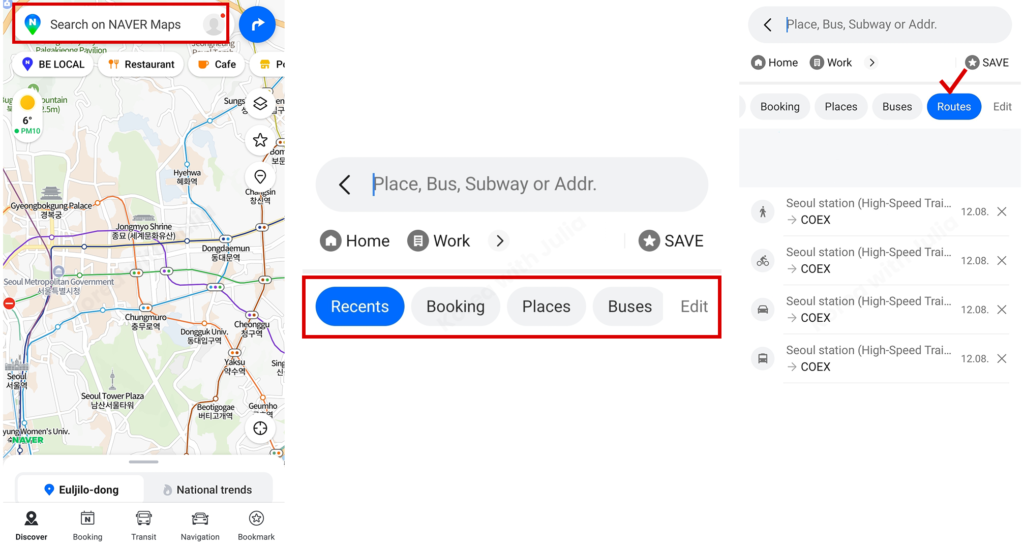
- Tap the search bar.
- Swipe the tabs(Recents, Booking, Places) to the side
(You can view your recently searched places in the “Recents” tab as well.) - Tap the “Routes” tab to see the routes you looked up earlier.
2. Searching for Public Transit Information
Subway
Let’s go from Myeong-dong Station to Lotte World in Jamsil.
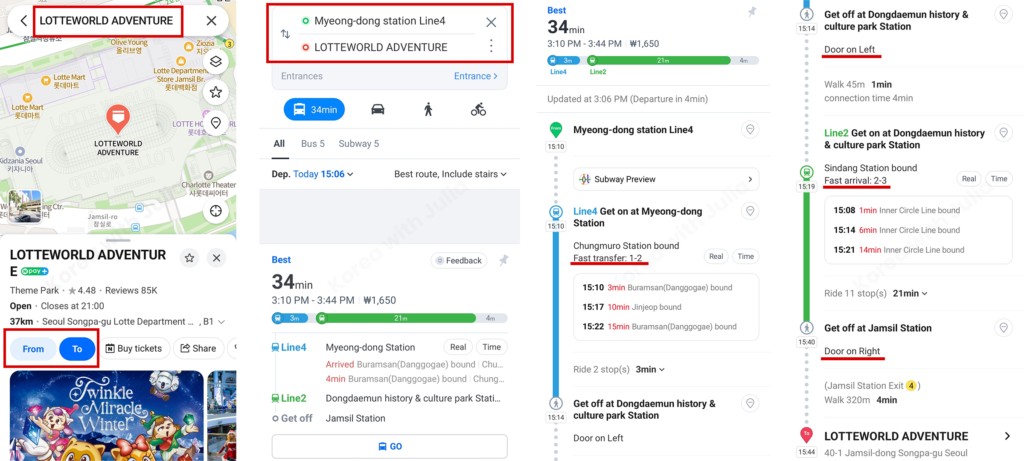
- Search for your destination.
- On the place information screen, tap“To” to set it as your destination.
- Enter your starting point. Naver Map will then show the recommended route first.
- This recommendation might be:
– the route with the shortest total travel time,
– the one with fewer transfers,
– or the route that arrives the soonest.
But in most cases, the route with the shortest total travel time appears at the top.
- “Fast transfer”:
This tells you which subway car is closest to the transfer corridor.
If you sit in this car and get off there, you can transfer more quickly. - “Door on Right / Door on Left”:
This tells you which side the doors will open on at your stop.
Of course, there will be announcements, but if you already know which side opens, you can stand near the right door and get off faster. - “Fast arrival”:
This shows which car is closest to the stairs or escalator leading to the exit.
If you get off here, you’ll reach the exit more quickly.
City Bus
Let’s go from Apgujeong to Samseong Station (COEX).
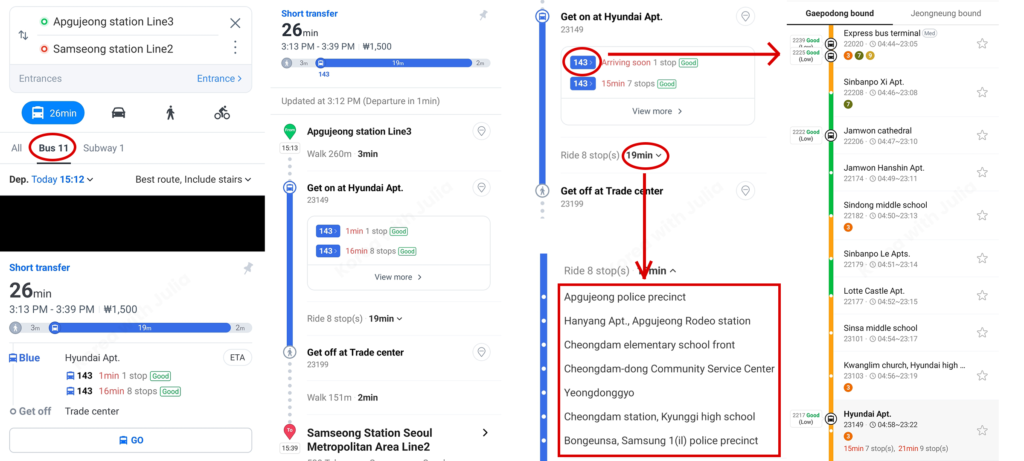
- Enter your starting point and destination, then tap the“Bus” tab to view bus-only routes.
- Tap the bus number (e.g., the blue 143) to see detailed bus information:
– Where the buses currently are on the route
– How crowded each incoming bus is
→ In the screenshot, “Good” means the bus isn’t crowded and many seats are available. - If you tap the travel time next to “Ride N stops,” you can see all the stops you’ll pass before reaching your destination.
Express Bus
Let’s go from Hongdae to Goyang Sports Complex (a popular concert venue outside of Seoul).
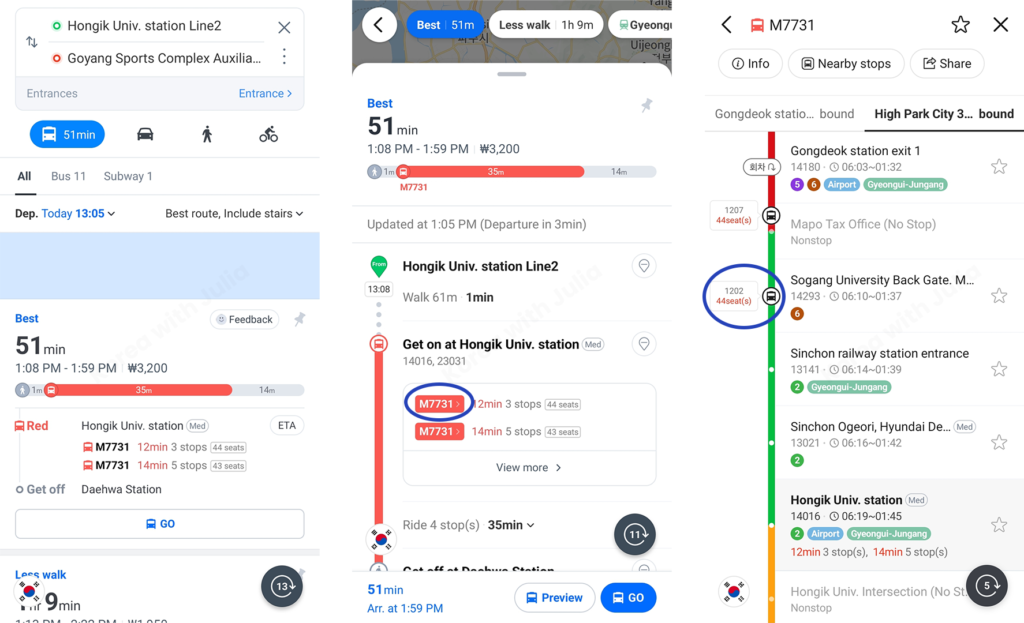
Just like with city buses, enter your start and end points, then check the bus routes in the Bus tab.
You’ll see:
- When the next buses are arriving
- Which stops they’ll pass
- Where each bus is right now on the route
One unique feature of express buses is, Naver Map shows how many seats are left.
While city buses allow standing passengers, express buses do not allow standing for safety because they run on highways.
3. Finding Restaurants & Cafes
Tap “Restaurant” or “Cafe” on the map to explore what’s nearby.
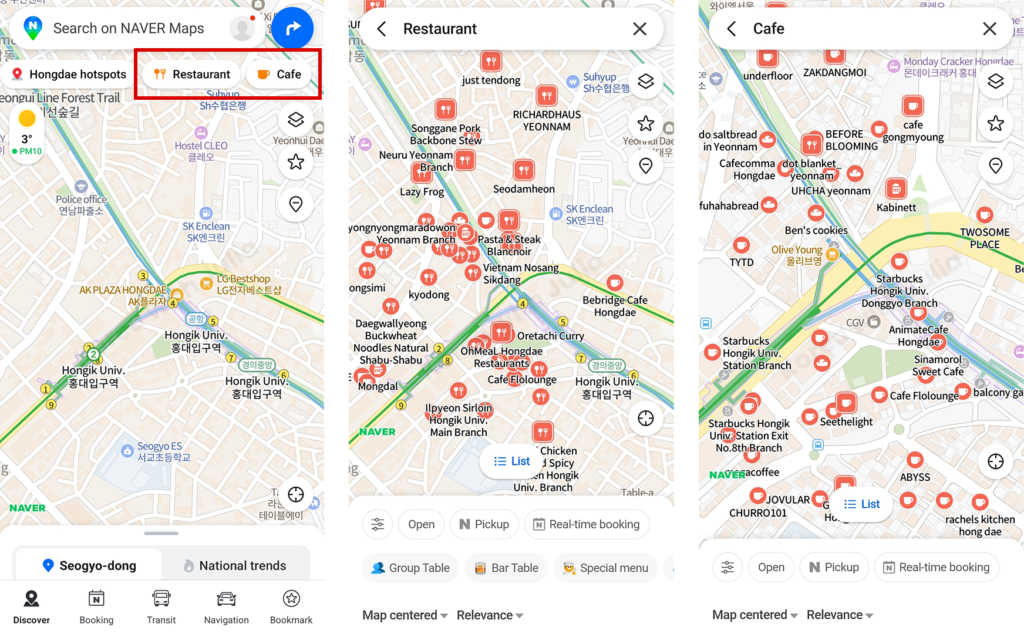
Not every restaurant or café will appear on the map immediately, so keep in mind that some places won’t show up unless you zoom in closer.
As you enlarge the map, additional icons for restaurants and cafes will gradually appear.
When you tap a specific restaurant or cafe, you can check its opening hours, break times, and any notices posted by the owner.
Some owners forget to update their information from time to time, so a few listings may not always be perfectly accurate.
Opening hours aren’t limited to food spots—you can check them for major tourist attractions as well.
For example, the Gyeongbokgung listing shows its operating hours, closed days, and other key details
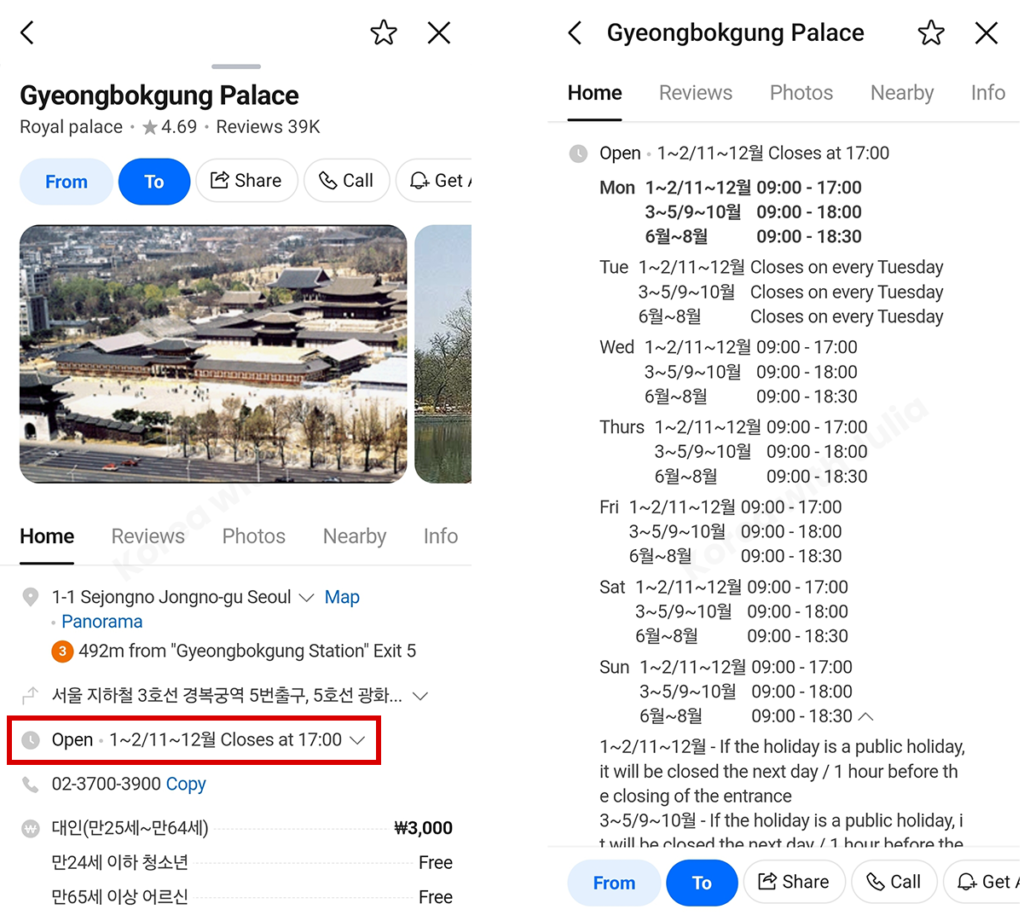
- If you tap the “Open” section on the place information screen, you’ll see details such as business hours, regular closing days, and break times.
You can also check reviews for each place.
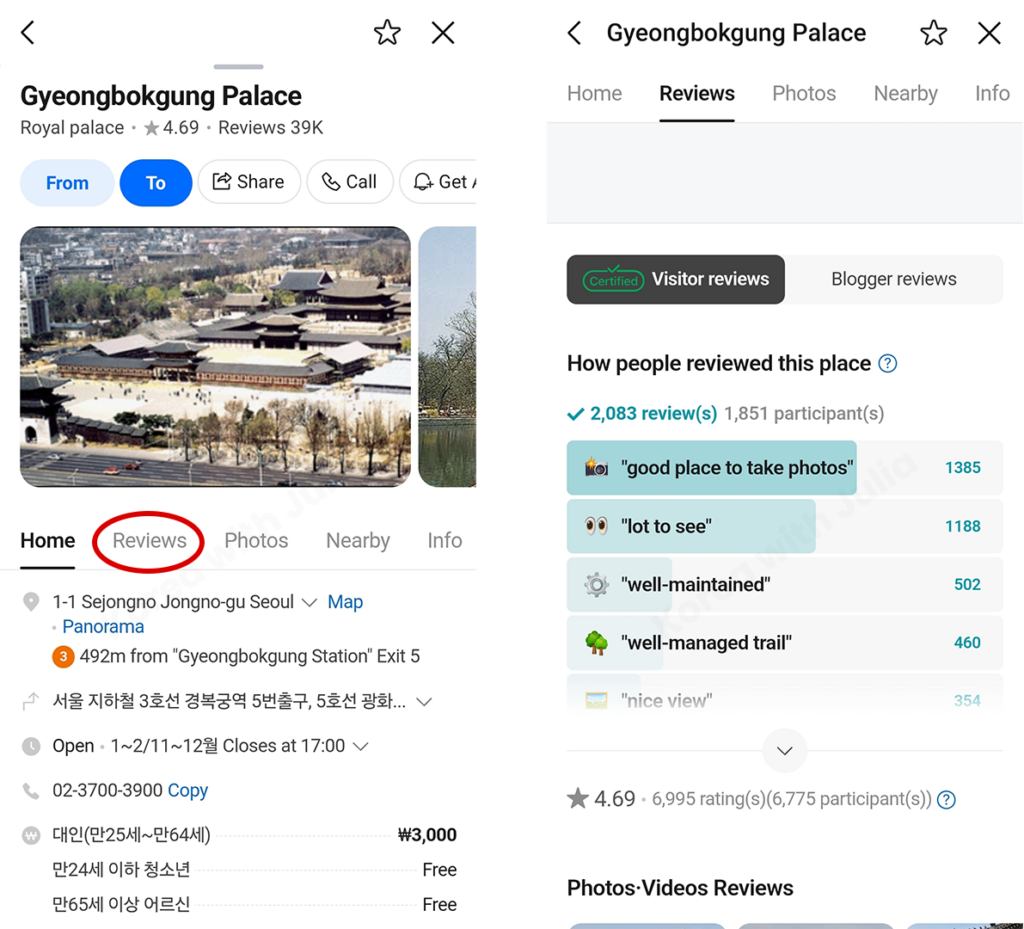
All you need to do is tap the location and then open the Review tab.
Reviews are written in Korean, but you can easily translate them using the Papago button, Naver’s built-in translation tool.
You don’t necessarily have to tap specific buttons to find places either.
Simply typing keywords like “italian,” “taco,” “dessert,” “donut,” or “flat white” into the search bar will show you related restaurants and cafes.
(Not every place matching your keyword will appear in the results, so the list may not be fully comprehensive.)

Extra Features You Get With a Naver Account
Having a Naver account is useful because it lets you save routes and bookmark your favorite places.
You don’t need a Korean phone number to sign up—your regular phone number from your home country works just fine.
If you’re planning to travel in Korea for a while, or stay here long-term, I really recommend creating an account.
It makes using the app much easier and gives you access to helpful features you’ll probably want later on.
4. Save Places With Bookmarks
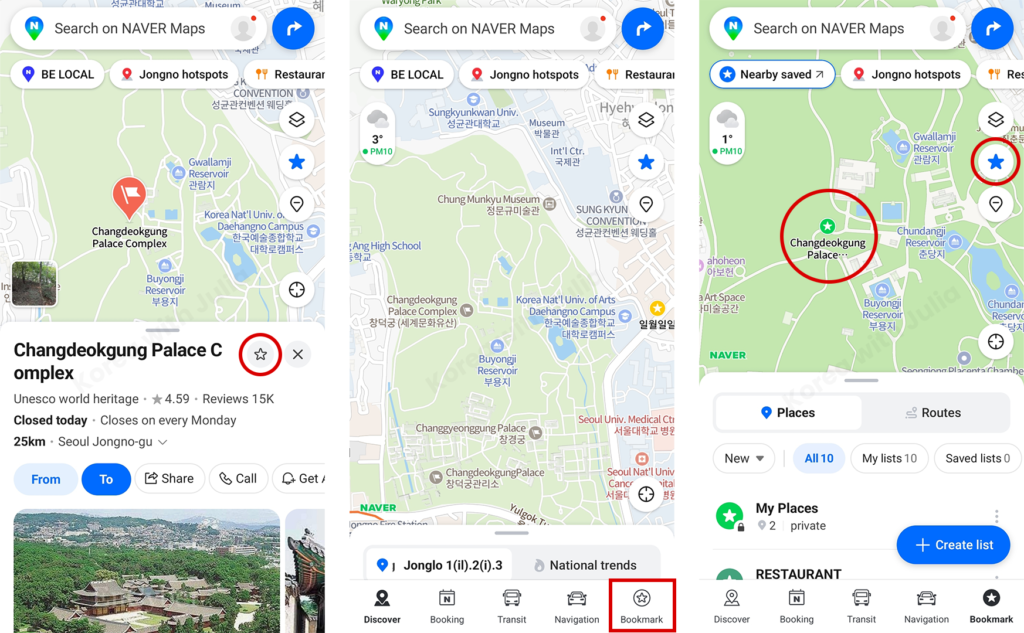
If you find a place you like, you can tap the star icon to save it as a bookmark.
Once saved, your bookmarks are easy to access from the Bookmark tab in the lower-right corner, and they’ll also appear on the map in the color and icon style you chose.
If you prefer not to see your bookmarks displayed on the map, you can tap the blue star icon on the right side to hide them.
This doesn’t delete your bookmarks, but it simply removes them from the map view so things look less cluttered.
5. Make Reservations
You can also make restaurant reservations directly through Naver Map.
Some places still use phone calls or separate apps, but many restaurants offer online booking through Naver Map, so it’s helpful to know how it works.
(The restaurant in the screenshot isn’t sponsored—it’s just one of my favorite Italian restaurants. I wish it were my friend’s place, but sadly, it’s not!)
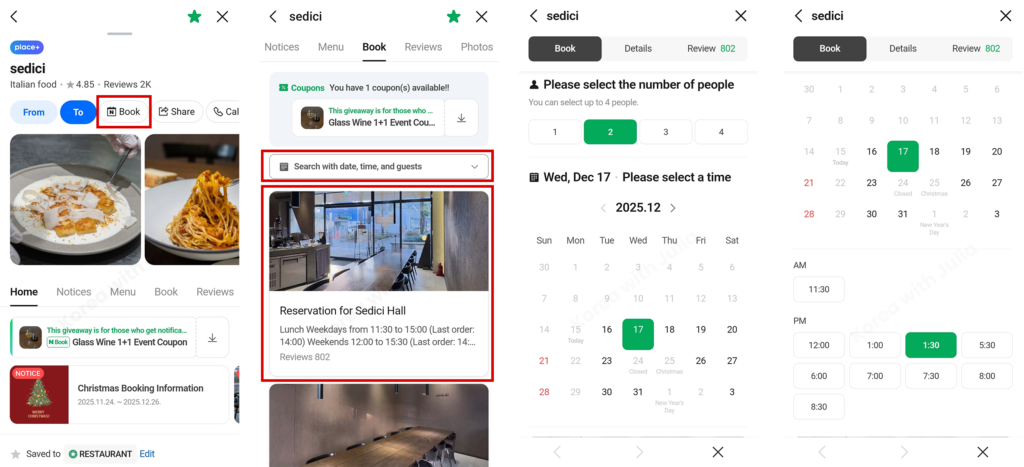
- Open the place page and tap the Book tab.
- You can tap “Search with date, time and guest,” but if the restaurant offers options like Hall or Room, it’s usually better to choose those first.
- After that, simply select the number of guests, the date, and the time.
With just these basics, you’ll have no trouble getting around in Korea!
Naver Map Will Be Your Best Friend in Korea!
Whether you’re in Korea for a short trip or planning to stay long-term, Naver Map will quickly become one of your most-used apps.
It gives you the accuracy, real-time updates, and local features that Google Maps simply can’t offer here.
Try using it for a few days, and you’ll feel the difference.
If you ever need help with Naver Map or want tips on traveling, cafes, or great neighborhoods, feel free to reach out!
If you’d like to get my new guides straight to your inbox, you can subscribe to the email list anytime.
More tips about Korea are on the way! 🇰🇷✨