
If you want to extend your stay in Korea or change your visa status, there’s one thing you must do first: report your employment information.
This includes details such as your occupation, industry, and annual income.
If any of that information changes, you’re required to report the update as well.
Until now, this meant visiting an Immigration Office in person and submitting a written report.
Many of my foreign friends in Korea have had to take the subway just to report a change in their employment information.
I know it’s not easy to find time to visit an Immigration Office while working. It’s far, and it’s inconvenient.
But here’s the good news.
Starting January 2, 2026, employment information can be reported online.
If you’re a foreign resident in Korea engaged in income-generating activities, this update matters to you.
Let’s get straight into it!
When You Can Report Employment Information Online
Technically, online employment reporting has existed since 2023.
However, due to limited accessibility, many foreigners were either unaware of the system or found it difficult to use in practice.
To address this, the Ministry of Justice expanded and improved the system starting in 2026.
If any of the following cases apply to you, you can now report your employment information online.
1. When Extending Your Stay or Changing Visa Status
If you’re applying for an extension of stay or a change of visa status, you still need to book an appointment at an Immigration Office.
You can do this through the HiKorea website.
Here’s what’s changed:
When you book an appointment on HiKorea, the employment information reporting screen will automatically appear if you’re required to report.
In other words, you’ll submit your employment information online before your visit rather than on paper at the office.
2. First-Time Reporting or Updating Employment Information
If you’ve completed foreigner registration (residence registration) and later begin income-generating work, you’re required to report your employment information.
In this case, you do not need to visit an Immigration Office.
You can report everything online through HiKorea’s “e-Application” service.
The same applies if you change jobs or move to a different industry.
If your employment information changes, you must report the update within 15 days.
You can also do this online through HiKorea’s “e-Application” service.
Visa Types Required to Report Employment Information
If you hold any of the following visa types, you are required to report employment information—and you can now do it online.
- Professor (E-1)
- Foreign Language Instructor (E-2)
- Research (E-3)
- Technical Instructor (E-4)
- Professional (E-5)
- Arts and Performance (E-6)
- Special Occupation (E-7)
- Seasonal Work (E-8)
- Non-Professional (E-9)
- Maritime Crew (E-10)
- Resident (F-2)
- Overseas Korean (F-4)
- Marriage Migrant (F-6)
- Work and Visit (H-2)
- Intra-Company Transferee (D-7)
- Corporate Investor (D-8)
- International Trade (D-9)
Related Post
Which Korean Visa Is Right for You? A Complete Overview for Foreign Residents (2026)
How to Report Employment Information: With an Immigration Office Appointment
As mentioned above, when you access the HiKorea website to book an appointment for an extension of stay or a change of visa status, the employment information reporting screen will automatically appear.
Visit HiKorea Website: hikorea.go.kr
Below is the step-by-step process.
(The procedure is based in part on guidelines provided by the Ministry of Justice.)
Step 1. Book an Appointment
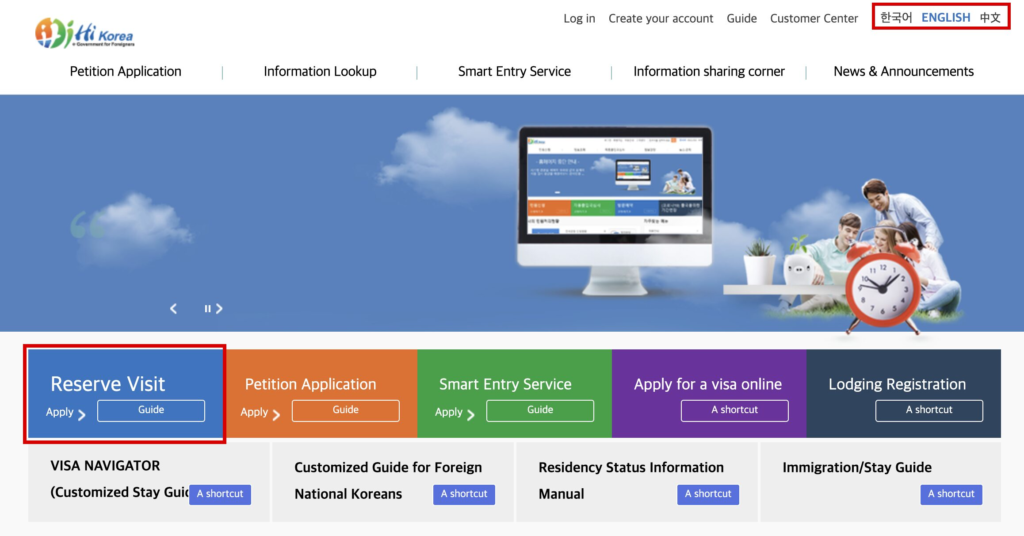
- Switch the site language if needed
- Click “Reserve Visit”
- Enter your reservation details
Step 2. Review Previously Reported Employment Information
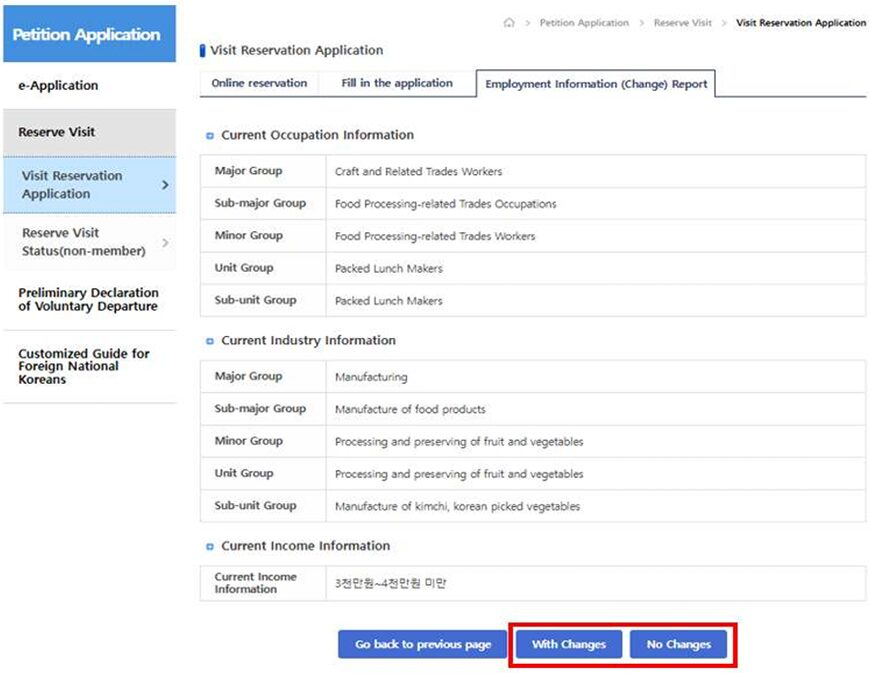
- If you’re subject to employment reporting, the reporting screen will automatically appear after you submit the appointment reservation form.
- If you have no previous employment information on file, the Employment Information (Change) Report screen will appear before you proceed with the appointment reservation.
- Select “With Changes” if you need to update any information.
Step 3. Enter or Update Employment Information
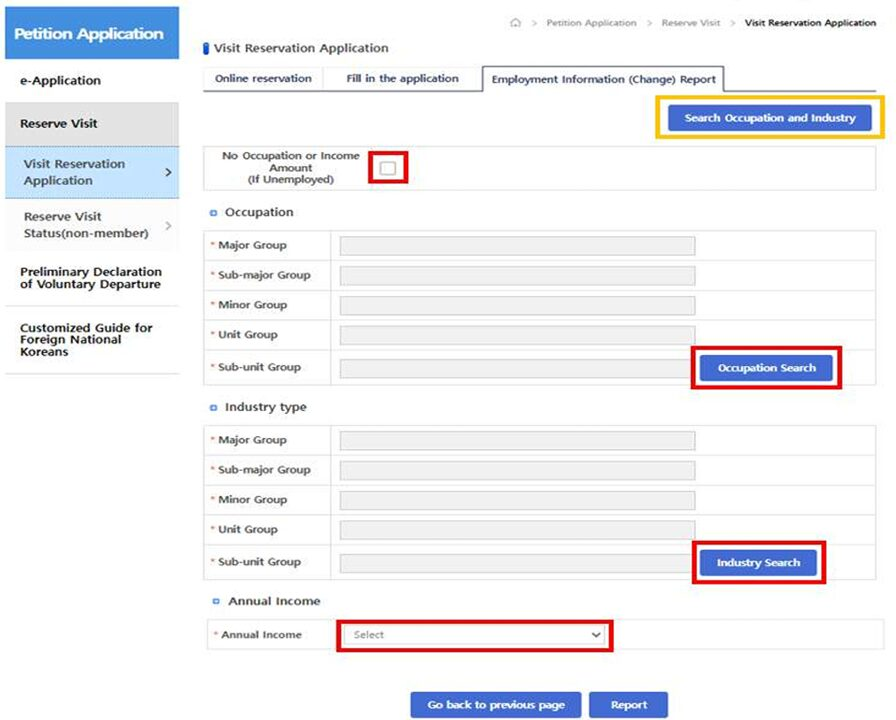
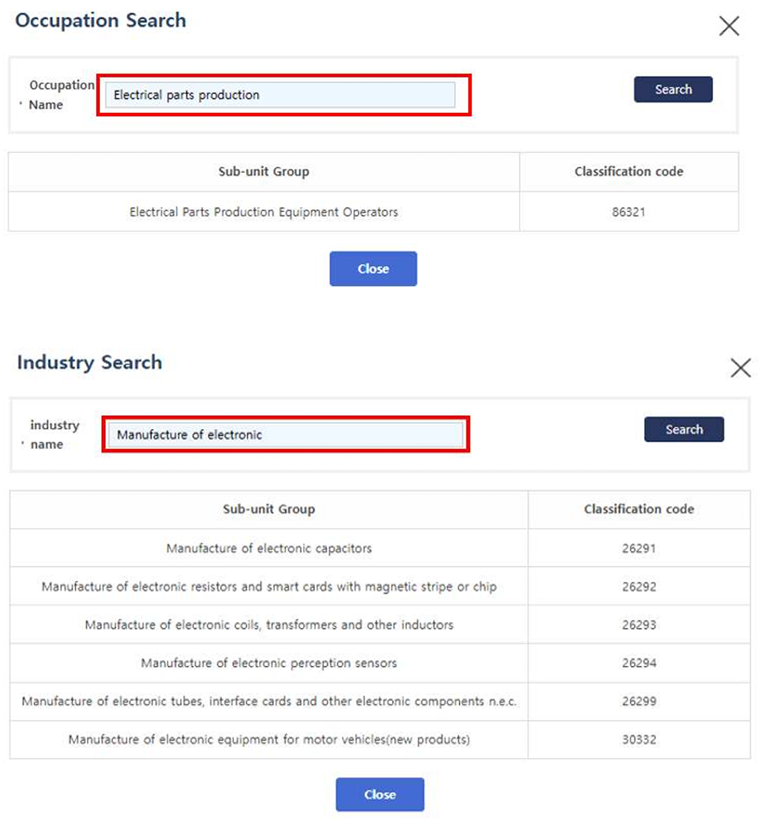
- Click the “Occupation Search” and “Industry Search” buttons, then search for your job to see the relevant classification.
If you are unsure about the correct occupation or industry keywords:
- click the “Search Occupation and Industry” button (highlighted in yellow above).
You can refer to the Occupation and Industry List provided by the Korean Statistical Classification System (KSSC) operated by the Ministry of Data and Statistics.
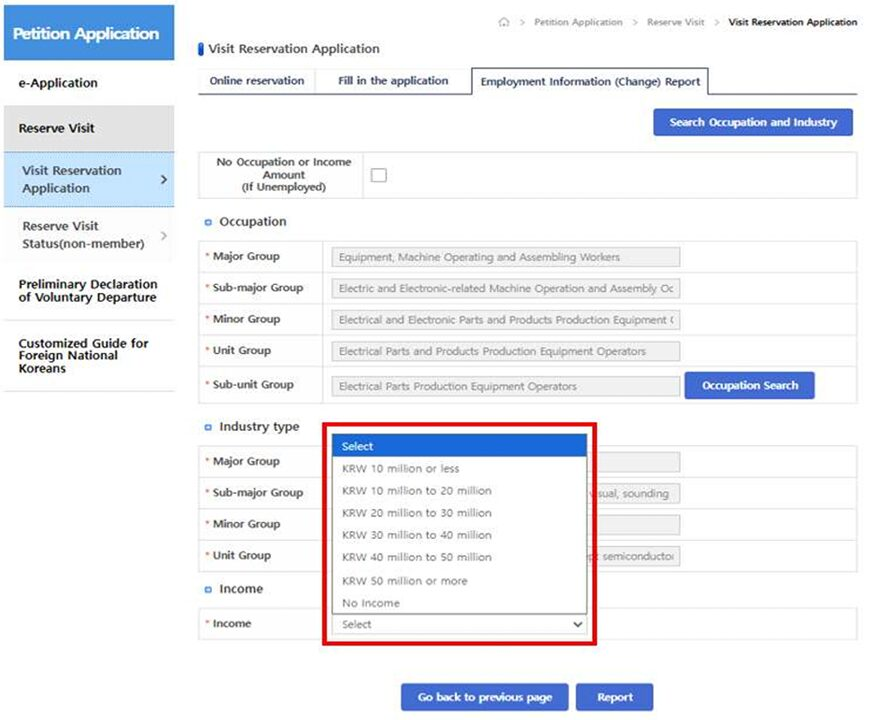
- Enter your annual income in the appropriate fields
- Click Report to complete the process
Step 4. Complete Reservation & Reporting
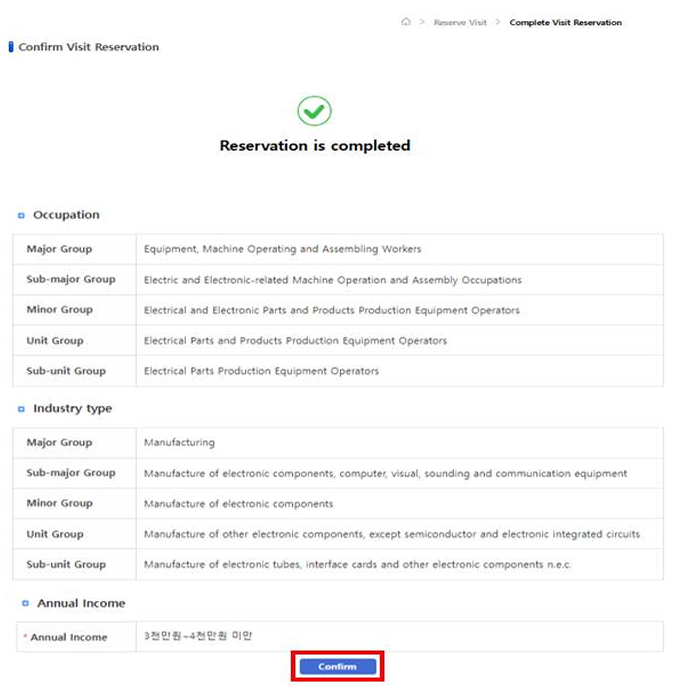
- You’ll see a “Reservation is completed” message along with your reported information
- Click Confirm to finish
That’s it!
How to Report Employment Information: e-Application (No Appointment)
If you only need to report or update employment information—or if you’ve become unemployed—you can use HiKorea’s e-Application service.
Visit HiKorea Website: hikorea.go.kr
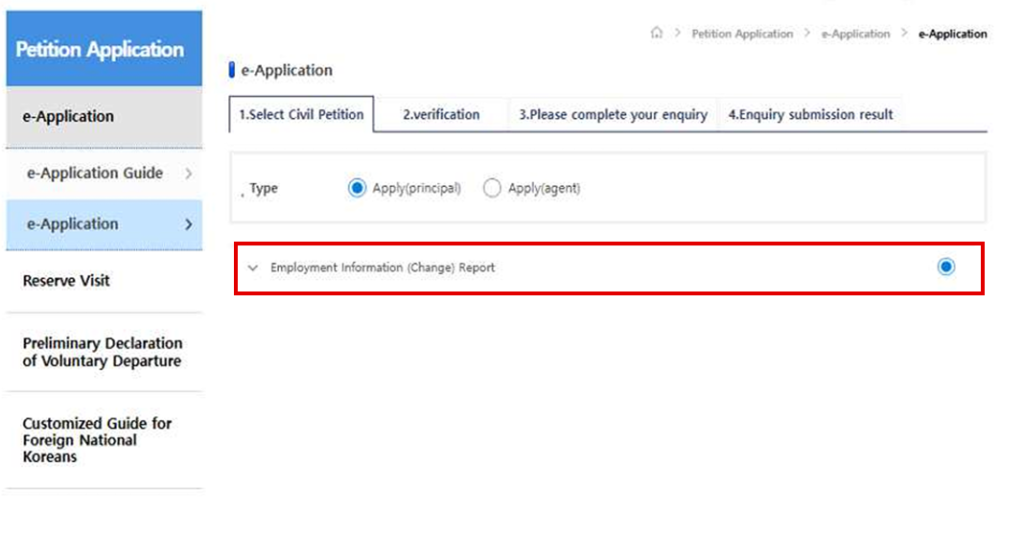
Step 1. Enter e-Application Service
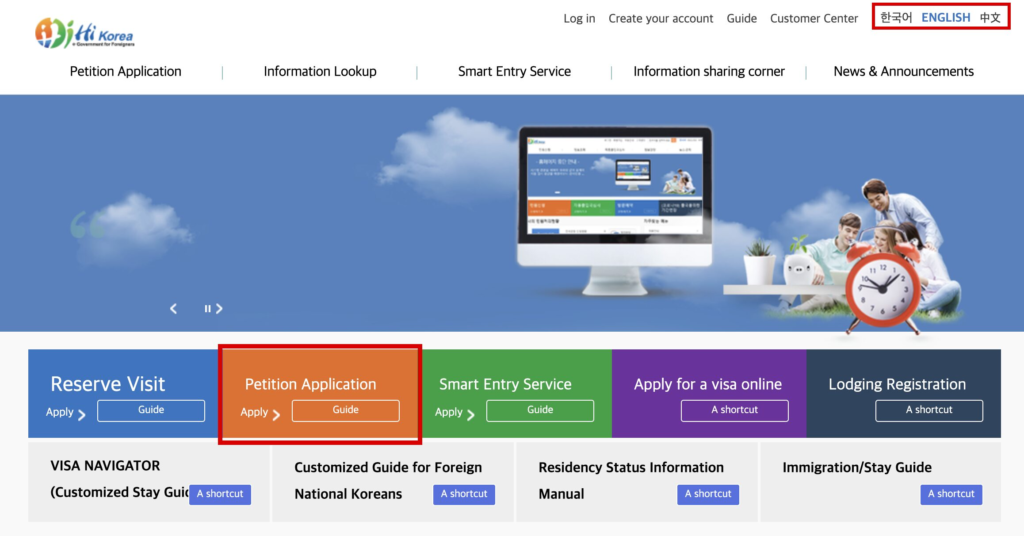
- Change the language if needed
- Click “Petition Application”
Step 2. Select “Employment Information (Change) Report”
Step 3. Enter or Update Employment Information
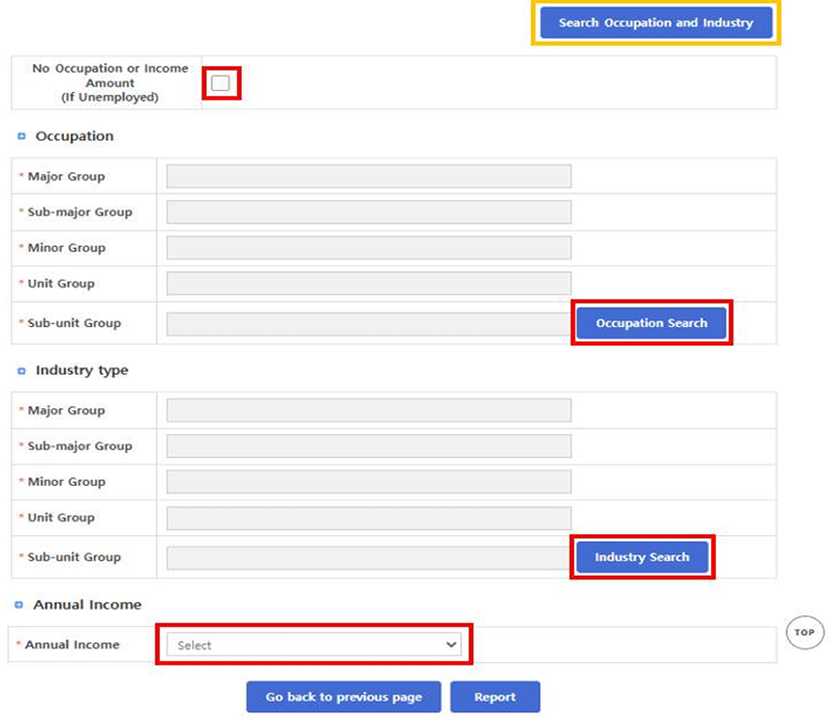
- If you’re currently unemployed, check “If Unemployed”
- Enter your updated occupation, industry, and income
- Click the “Occupation Search” and “Industry Search” buttons, then search for your job to see the relevant classification.
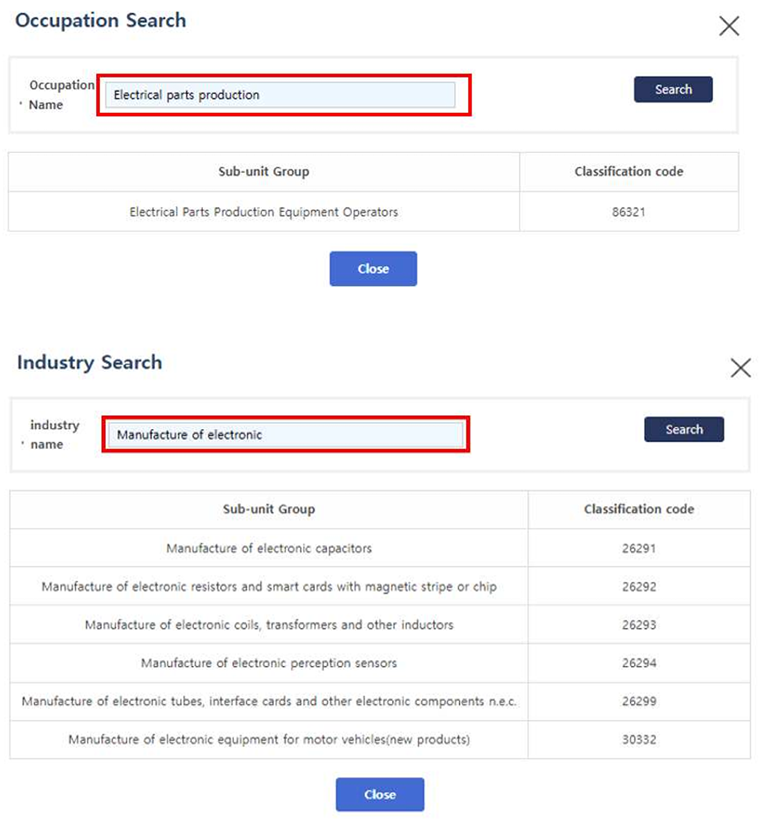
If you are unsure about the correct occupation or industry keywords:
- click the “Search Occupation and Industry” button (highlighted in yellow above).
You can refer to the Occupation and Industry List provided by the Korean Statistical Classification System (KSSC) operated by the Ministry of Data and Statistics.
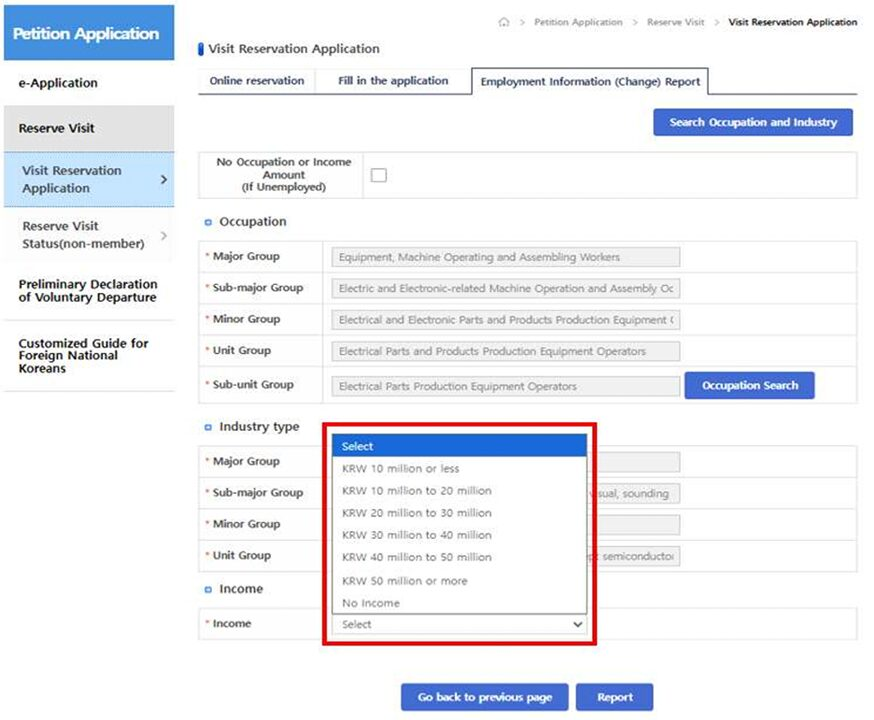
- Enter your annual income in the appropriate fields
- Click Report to complete the process
Step 4. Review & Print Certificate (If Needed)
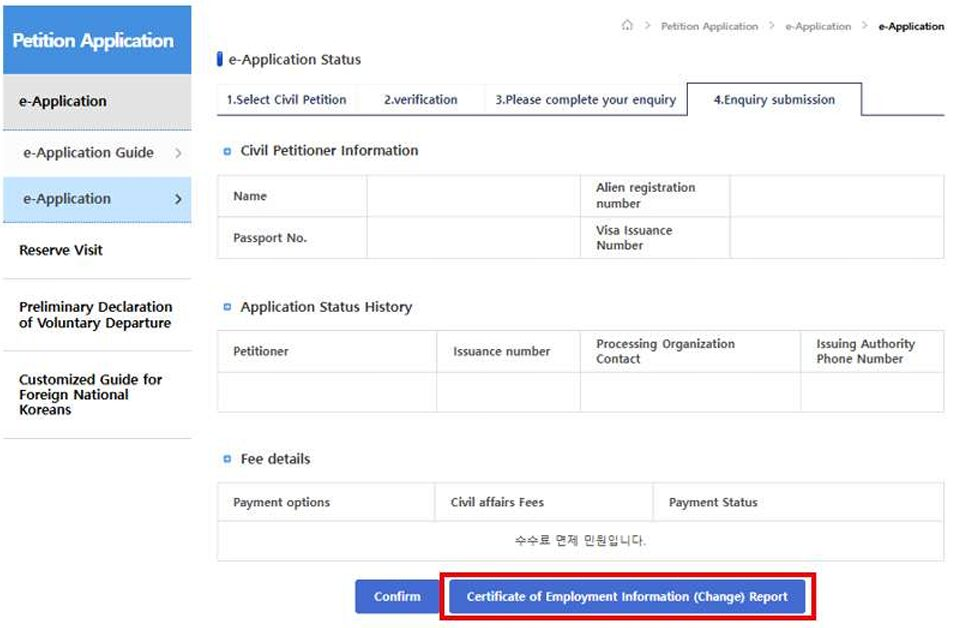
After submitting the form, you’ll see a results screen displaying your updated employment information.
If you are:
- using a registered immigration service agency
- or visiting an Immigration Office without a reservation
You should print the “Certificate of Employment Information (Change) Report” and bring it with you.
Otherwise, simply click Confirm to finish.
I hope this guide made the new system easier to understand.
I’ll continue sharing updates on policies and systems that actually matter for foreigners living in Korea.
Stay tuned—and good luck with your reporting! 🇰🇷✨
Leave a Reply